Local-First · End-to-End Encrypted · Forever Yours

Save the web pages that matter.
Own your archive forever.

Store complete webpage snapshots directly on your own disk—read, highlight, and annotate completely offline. Sync seamlessly across devices via iCloud Drive or your own end-to-end encrypted S3 bucket, with no central server.

macOS 13+ (Apple Silicon / Intel) · No account required · Zero lock-in

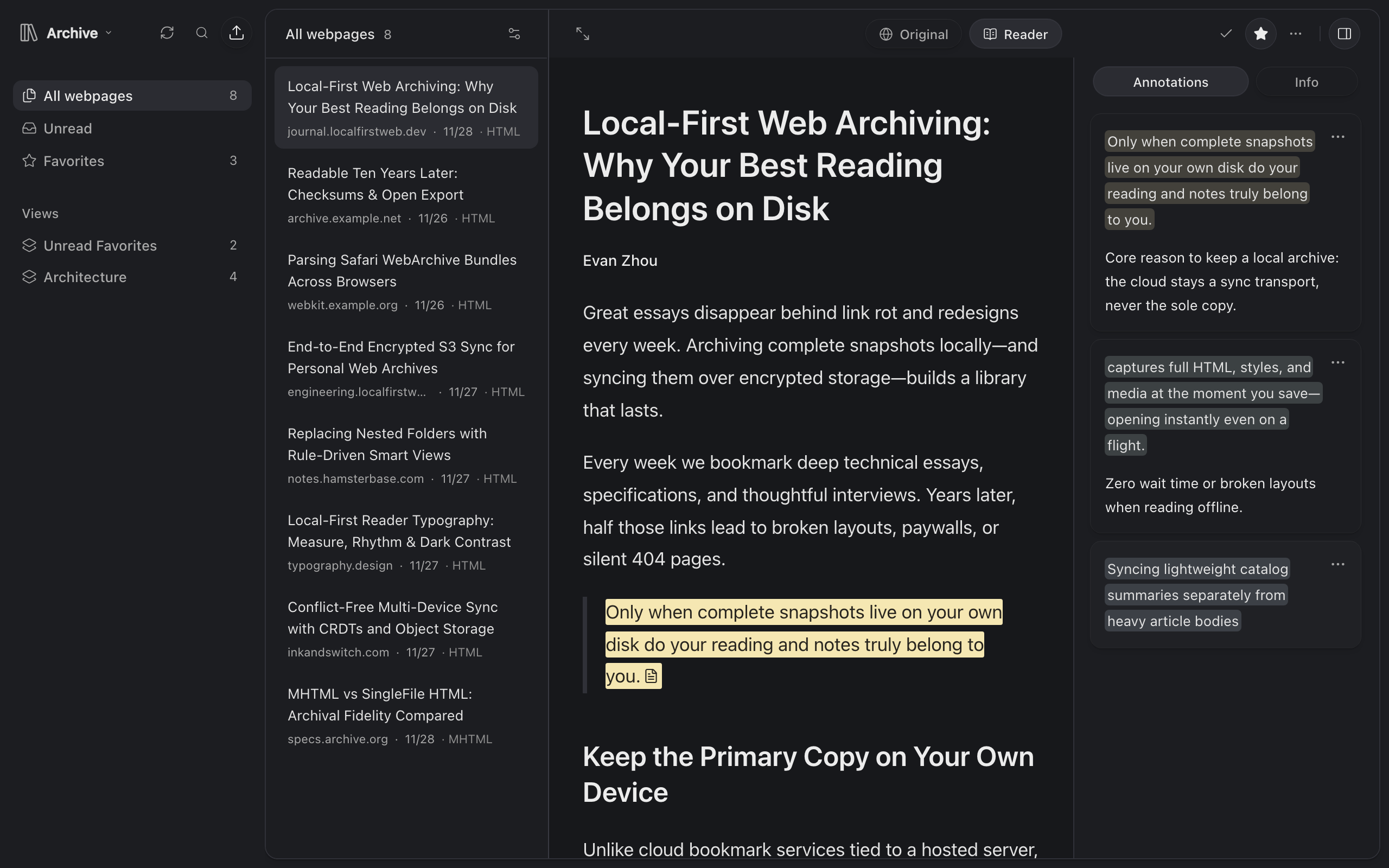
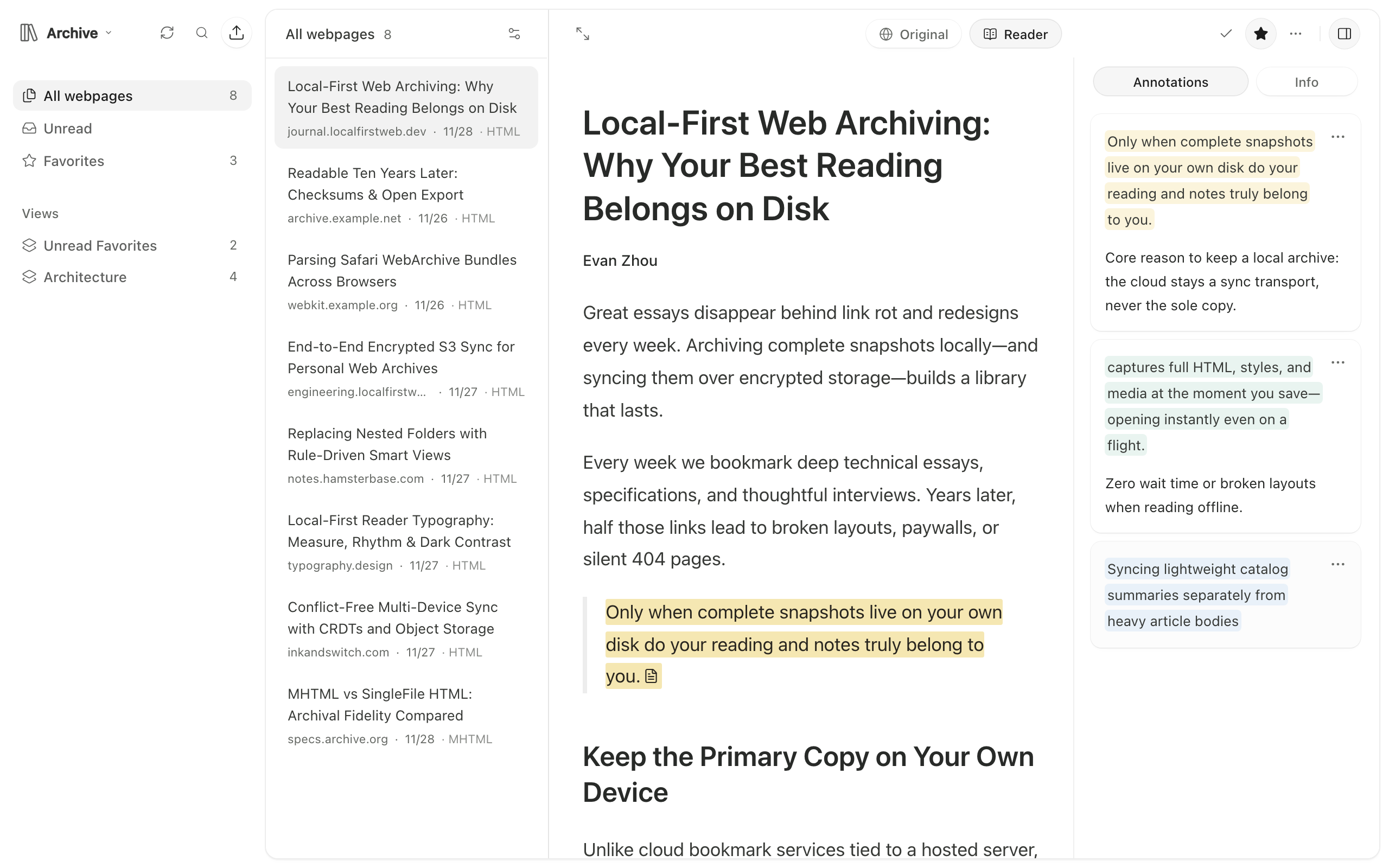
Real screenshot of HamsterBase desktop Reader Mode with multi-color highlights and annotations sidebar Real screenshot of HamsterBase desktop Reader Mode with multi-color highlights and annotations sidebar

Forever Yours

Snapshots, highlights, and notes stay in folders you control—exportable in original formats with zero lock-in.

True Local-First

No account and no hosted server. Open saved pages instantly offline, read cleanly, and capture notes.

Seamless Sync

Sync across devices with iCloud Drive or your own S3 storage; offline edits merge cleanly via CRDTs.

End-to-End Encrypted

Encrypted locally with a 12-word recovery phrase before upload. Keys never leave your device—clouds see only ciphertext.

Complete ownership,
seamless everywhere

Local storage, conflict-free sync, and local encryption engineered together—so you never have to choose between privacy and convenience.

Local-first, instant offline
Your local copy is always the primary copy. Open full snapshots, highlight passages, tag, and take notes offline—immune to link rot or service shutdowns.
Zero-knowledge local encryption
Keys are derived locally from your 12-word recovery phrase. Snapshots, metadata, and notes are encrypted on-device before reaching your own S3 bucket.
Seamless sync & on-demand loading
Sync via iCloud Drive or any S3-compatible bucket (R2, AWS, MinIO). New devices open the catalog instantly, fetch bodies on demand, or cache everything offline.
Open formats, readable forever
Import MHTML, HTML, and WebArchive with content-hash deduplication. Even if you stop using HamsterBase, export original files anytime and open them in any browser.
Calm reader, notes & Smart Views
Clean HAST Reader Mode restores calm typography with multi-color highlights, margin notes, instant ⌘K search, and one-line Smart View rules.
Multi-library desktop & mobile reader
Run separate libraries side-by-side in desktop windows, and finish reading on mobile with a focused queue synced seamlessly over encrypted S3.

Choose the installer for your Mac

Works completely offline with no account or subscription—your archive belongs only to you from day one.

Want to try it first? Open the live desktop & mobile Web Demo ↗

macOS · Apple Silicon

v2026.11.2900

For Macs with Apple Silicon (M1 – M4)

Download DMG

macOS · Intel

v2026.11.2900

For Macs with Intel processors

Download DMG

Start free. Pay once for unlimited archiving.

Use every core feature free for up to 200 pages. Upgrade once to remove the limit and unlock lifetime HamsterBase Tasks cloud sync.

Free

No account

Full local archiving, offline reading, and encrypted sync.

$0 Free forever
  • Up to 200 saved web pages—existing archive is never locked
  • HAST Reader Mode, multi-color highlights, notes & Smart Views
  • Local folders, iCloud Drive & end-to-end encrypted S3 sync

What ships today and what comes next

Rebuilt on a new local-first architecture focused on data ownership, offline reliability, and encrypted sync first.

Available Today
  • Native macOS desktop, Web desktop & mobile read-later views
  • Local storage, iCloud Drive, and end-to-end encrypted S3 sync
  • MHTML / HTML / WebArchive import, dedup & original-format export
  • HAST Reader Mode (incl. X articles & threads) with reading anchors
  • Instant search, multi-color highlights, notes, tags & Smart Views
Coming Next (Before 1.0)
  • Full-text search across saved article bodies
  • Drag-and-drop import directly onto the main window
  • Upgrade local-only library to S3 & rotate credentials
  • In-app version update checks
Planned Later
  • Native iOS & Android companion apps
  • Legacy HamsterBase library batch migration tool
  • Open local API & Obsidian highlight export
  • Windows & Linux desktop installers

Ownership, encryption, and sync

Have more questions about local archiving or sync?

Read docs & contact support →
The desktop app stores complete webpage snapshots in the local folder you choose. With S3 sync enabled, everything is end-to-end encrypted on your device using your 12-word recovery phrase before syncing to your own bucket—neither your cloud provider nor HamsterBase can read it.
Yes. Choose local storage to start using HamsterBase on your Mac right away with no account. To sync seamlessly across multiple Macs, simply place your library inside iCloud Drive.
It stays yours forever. Export any snapshot back to its original MHTML, HTML, or WebArchive file and open it directly in any modern web browser—with zero proprietary lock-in.
Save the page from your browser as MHTML, SingleFile HTML, or Safari WebArchive, then import it into HamsterBase to extract metadata, deduplicate by content hash, and read offline.